
YouTube has grown from just being a platform with amateur video content to a social video platform where marketers and businesses can connect with their target audience.
It is the second most popular website globally, with over 3 billion monthly active users.
According to the 2021 social media examiners report, YouTube is the most used video channel for marketers.
55% of marketers make use of YouTube to stay competitive with other brands.
So, it’s no wonder that so many businesses are using the video platform.
One way to stay ahead of the competition is by running YouTube Ads.
You can tap into this huge market by learning how to set up YouTube ads.
This article will cover all the different YouTube ad types in 2021, how to launch a campaign, and different tips that can help you stay on top of the advertising game.
What is YouTube Advertising?
This is a way to advertise your product or service on YouTube.
The video content you’re advertising can be found in search results on YouTube, or it could be the video played before a user can view the main video they want to watch.

YouTube ads are just like your regular Google ads, but they only appear alongside related YouTube videos, not outside the platform.
Why Are YouTube Ads A Great Opportunity?
YouTube has over 1.3 billion users, over 5 billion views every day, with an average session lasting just over 40 minutes.
No matter what you are looking for on YouTube, you’ll be able to find hundreds of videos with hundreds of thousands of views.

So your offer could be right there in front of these buyers.
Whatever you are doing online, this works amazingly because people are already watching a bunch of monetized videos.
People are not just watching YouTube videos because they’re a bit bored.
They go on YouTube to learn, and more importantly, spend money.
Consumers visit YouTube to look for reviews of products to help them make wise purchase decisions.
For marketers, this is the perfect time to put yourself front of your prospects: when they’re eyeing your competitors.

That’s the time to show them your stuff.
The Different Types of YouTube Ads
When you are ready to run ads on YouTube, you’ll need to choose from the different types available.
Here are the ones a user can create.
- TrueView ads
- Display ads
- Overlay ads
- Sponsored card ads
- Bumper instream ads
- Non-skippable instream ads
TrueView Ads Explained
We’ll be covering this YouTube advertising type in detail because it is the main format used on the platform.
With TrueView ads, viewers have higher control over the adverts they see.
Even though viewers have huge control over what they see, it is a great ad format for businesses as advertisers only pay for when viewers watch at least 30 seconds of their video ad.

And they pay when there is an interaction with the ad in some way, like clicking on the call-to-action.
This ad type helps save advertisers money since viewers can select which ads they want to watch and skip the ones they don’t.
The minimum length a TrueView video ad can be is 12 seconds, and the maximum is 6 minutes.
TrueView ads are subdivided into in-stream ads and discovery ads.
Let’s discuss them too.
TrueView Instream Ads Explained
When a viewer chooses a video, the ad that plays before the main video is a TrueView instream ad.
This ad format features a countdown timer and a link to the website you’re advertising.

It also had a companion banner ad that can be found right above the suggested video list.
TrueView Discovery ad Explained
This ad format appears on the right-hand side of watch pages, right above the suggested videos list and in YouTube search results.

It usually consists of up to three lines of text and an image thumbnail.
TrueView ads are low-risk ads that can reach your target market at a low cost.
This is a great way to start running YouTube ads as a beginner because you are certain your budget is spent on viewers interested in your ad.
Secondly, you are not restricted by time limits since viewers can opt to see the video or not.
Viewers perform a simple YouTube search, and if they match the advertiser’s criteria, a discovery ad might appear.
A down side of these ads is that they can affect your channel’s analytics as retention can be low for these ads unless your delivery is spot on.
Display Ads Explained
This type of YouTube ad format appears to the right-hand sidebar of a video player, and it’s only available on a desktop.
They come in different sizes and formats like animation and image, but they do not support auto-play sound.
The viewer will have to enable the sound when they click on the animated thumbnail.
Video discovery ads are arguably the easiest to set up.
Overlay Ads Explained
These are image ads that appear on the bottom of the YouTube video player on watch pages.
Overlay ads only pop up across the bottom 20% of the video player after a video starts playing.
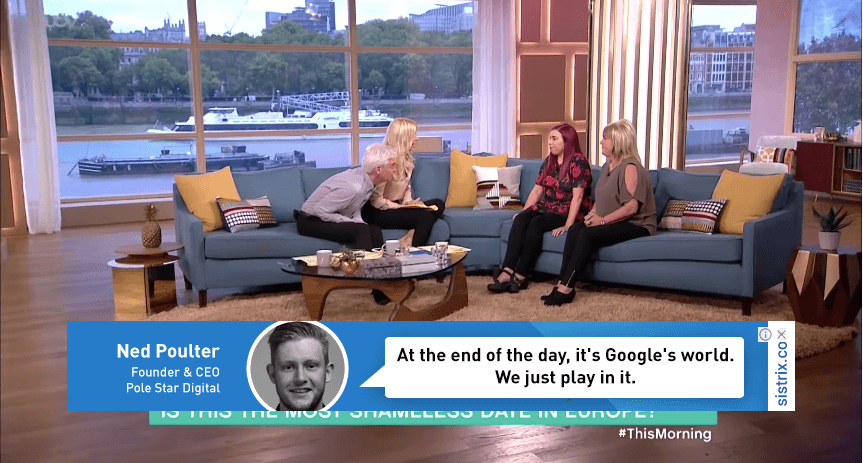
It can be as simple as a text or image, and it is not intrusive.
Viewers can see your ad while they keep watching their main video, and they close the ad at any time.
You only pay for the ads when viewers click on the overlay ad to see the full ad campaign.
Sponsored Card A Explained
YouTube sponsored cards are unobtrusive ads that appear as a small call-to-action popup within videos.
This popup ad only expands when a viewer clicks on a small ‘i’ symbol in the upper right-hand corner of a video.
A sponsored card contains more information about a product than a display ad.
Bumper Instream Ad Explained
This ad format is a non-skippable video ad that is less than 6 seconds long, and it must play completely before a viewer can continue their video.
Advertisers pay for bumper ads based on cost-per-mile (CPM), which means that you pay a fee per thousand views.
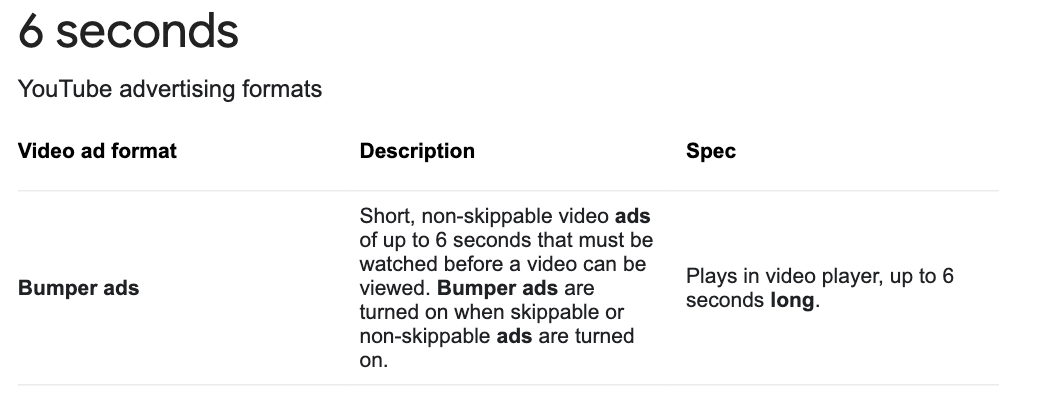
If you intend to run a large campaign featuring other ad formats, then use bumper ads.
When it comes to short ads, creativity is key.
With only 6 seconds of time before the next video rolls in and takes over your feed, a creative strategy needs to be executed quickly or else you’ll lose viewers right away.
Each second counts when there are so few; if not already done with one bumper ad format after six seconds have elapsed because they’re often used for educational purposes!
As a beginner to YouTube ads, you should only run bumper ads if you know ad targeting to not waste your budget advertising to wrong prospects.
If you have doubts, avoid this type of video ad.
Non-Skippable Instream Ad Explained
These ads are in-stream and video viewers can’t skip them unlike TrueView in-stream ads which are skippable.
Non-skippable ads are between 15 and 20 seconds, and they can play before, partway through, or at the end of a 10 minute or longer video.

YouTube’s non-skippable ads are a type of CPM advertising, which stands for cost per thousand.
Advertisers pay YouTube to display their ad or video on the page that has reached over 1,000 views.
Just like bumper instream ads, you only pay for non-skippable ads based on a cost-per-mile (CPM).
They’re charged by the number of impressions created rather than clicks made.
This means its especially important not to waste your budget choosing poor prospects as potential viewers.
Instead hone in on targeting so you can reach an audience most likely to find value in what you have offer them with these high exposure advertisements!
Advertising on YouTube – A Deeper Look
As a beginner on YouTube advertising, everything may seem different from other platforms, but not to worry, it’s almost the same but with different guidelines.
YouTube advertising can influence buyer decisions, build brand awareness, increase brand loyalty, and grow sales.
Influence The Buyer Decision
Before setting up an ad on YouTube, you should have a great ad copy and video content that justifies why your product is the best option for your customer.

You should use hard evidence to show them and capitalize on that evidence.
Build Huge Brand Awareness
You can use YouTube to build brand awareness.
Introduce your service or product to people who don’t know about it yet, or those looking for more information.
One way to build brand awareness is by targeting people who are interested in similar products.

Increase Brand Loyalty
Show your audience that you provide the best products and services in the world by inviting your customers to review your product in your videos.
Grow Your Sales
Do proper target audience research before you run your ads to start growing sales.
The new tactic is to target lookalike audiences that you have never targeted before.

A Look At Creating Your YouTube Ads
If this is your first time creating an ad on any social platform, you’ll need to create an image, video, and ad copy.
You can check out the YouTube ads leaderboard for inspiration.
Follow These Clear Steps
- The first thing you need to do is to upload your YouTube video advert to YouTube. Ensure that you fill in all the necessary information like the tags, title, and description.
- Once you’ve successfully uploaded your video, you are ready to set up your ad campaign. Go to your Google Ads account, and if you don’t have one, here’s a guide to help you set up one. Once your account is all set up, create a new campaign.
- The next thing is to select a campaign type from the five options there. Choose a video, and you will be redirected to select a single goal. This means you should select what you need the ad campaign to do. For example, if you want to increase your website visitors using YouTube, you will select the “website traffic” goal. You can also create a campaign without a goal, or you can add or remove a goal any time.
- After that step, you need to configure your campaign. Choose a name, set your budget, choose your start and end dates, select a language and location, select your networks, select your bidding strategy, choose an inventory type and exclude content.
- Once you have configured that, you need to select your target audience. You can define them by age, gender, parental status, etc.
- Then, you have to select the type of content you want your ads to appear on.
- Next, select the advertising video that you uploaded.
- Lastly, you need to select any of the video formats we discussed above. YouTube will show you the ones available to you based on the campaign selections you’ve made.
YouTube best practices
The first three to seven seconds of your YouTube video ad are the most important.
These moments must be engaging for viewers who may only have a passing interest in your product or service.
But if they see something that catches their attention then there is potential for them to pay even more close attention and stay tuned until the end!
One great way you can capture viewer’s attentions spans is with storytelling.

Most ads these days will tell some sort of story from beginning to end while focusing on one central aspect.
This method has proven time and again as being very effective at retaining a person’s focus throughout what could otherwise be considered lengthy content pieces.
How To Write a Compelling YouTube Ad Script That Inspires Action
The tone should come from an educated person who is passionate about their subject matter or product; if people feel as though they know what this individual knows then they will see themselves reflected in the brand
Do not forget to add your headline, URLs, and CTA.
The Benefits of YouTube Advertising
The potential cost of YouTube advertising can put off some small companies.
This might be because a lot of companies simply don’t have much to invest, or maybe they are not seeing the ad revenue that other forms of advertising are bringing in.

Video content is so popular nowadays and people are engaging better when it comes to videos on a platform like YouTube than they would any form of social media ads.
Because of this, they work out well for smaller businesses who want increased return from their marketing efforts but don’t yet have the funds necessary to spend big on Google Ads PPC.
An Overall Summary
So, are YouTube ads good for beginners?
Hopefully this article has answered that question.
YouTube ads may seem overwhelming, especially if it’s your first time setting up a campaign, but you don’t need to worry.
This article will help you navigate your way.
With video content predicted to become 82% of all web traffic by 2022, you should start using this marketing channel now.
Follow what is laid out in this post and your first YouTube ad campaign will stand a chance of success.
With that said, go and upload your video to your YouTube channel get your first YouTube video ad up and advertise on YouTube.
