
Video is a powerful strategy that every brand and marketer should be leveraging for brand awareness.
Whether you run a small business, a personal brand or a large company, video marketing is extremely useful.
A study revealed that 93% of businesses acquired a new customer thanks to a video they shared on their social pages [1].
Another study found that 86% of consumers are looking forward to seeing more videos from brands [2].
These statistics point to the need to engage prospects and customers with videos.
If you’re not currently using the video format in your marketing strategy, chances are that you’re worried about the technical aspect of production.
Also, for many small businesses, the cost of video production can be worrying.
Thankfully, there are now many easy-to-use video marketing tools you can use to support your video marketing strategy.
Whether you’re looking to create and post videos on your website, YouTube or social pages, these tools will aid the process.
Video Marketing Tools Worth Checking Out
Below is a list of some of the most popular video marketing tools.

We’ve broken them down into subsections to help you identify the best video marketing tools for video creation, editing, management and so on.
Naturally it was not possible to include everything on the market place, so we limited it to the video marketing tools we felt deserved to be considered.
Video Creators
- Animoto
- Wave.Video
- Vyond
- Filmora
- In Video
- Hippo Video
- UScreen
Video Editors
- OpenShot
- Lightworks
- WeVideo
- Blender
- Camtasia
- Da Vinvi Resolve
- iMovie
Video Management
- TubeBuddy
- Social Blade
- VidIQ
- AgoraPulse
- YouTube Studio
- MorningFame
Video Hosting
- Dailymotion
- Vimeo
- Amazon AWS
- Wistia
- Vidyard
- Sprout Video
- YouTube
YouTube Ads
- Tubesift
- Biteplay
Text to Speech Software
- VoiceOverMaker
- Voicemaker
- Micmonster
- Amazon Polly
- WellSaid Labs
Stock Footage
- Pexels
- Coverr
- Pixabay
- Shutterstock
- ArtGrid
Webinars
- WebinarJam
- ClickMeeting
- GoToWebinar
- Demio
- Stealth Seminar
- Ever Webinar
So, let’s kick off this monster article and see which video marketing tools are worth your time.
Video Creators
When it comes to best video marketing tools, the first thing you need to consider is how to craft the actual marketing videos.
Some tools allow you to create professional videos, whereas other tools can help you with more basic ones.
Animoto
Animoto offers an easy drag-and-drop feature to help you quickly create and share videos for your brand or business.

Whether you’re a business owner, marketer or online video creator, you can easily use this tool for video creation.
Pros
- It offers a drag-and-drop feature that requires no previous technical experience. This allows anyone to easily create videos to share online.
- Animoto offers video templates, based on your desired video type, to help you easily get started. For instance, there are templates for social media videos, tutorial videos and slideshows.
- It offers options for colours, fonts, music, footage and photos to help create on-brand videos for your marketing strategy.
- You can get started for free.
Cons
- Using the free plan will place the Animoto watermark on your videos. You’ll need to upgrade to a paid plan to remove the watermarks. This is the case for most tools that offer both free and paid plans.
Cost
All of Animoto’s plans give you the opportunity to create unlimited videos.
There’s a free plan, a professional plan of €14 per month (billed as €168 per year) and a professional plus plan of €35 per month (billed as €420 per year).
Animoto is available on both desktop and IOS.
Wave.Video
Wave is an all-in-one video marketing tool that offers video creation, editing and a cloud-based video hosting.
With this tool, you can quickly create your video marketing campaign all in one place.
Pros
- Wave.video offers several video templates you can choose from. The site houses social media templates, ads and promo templates and even the option of picking based on your industry.
- You can access video analytics through your dashboard on Wave.video.
- Wave.video comes with a built-in voiceover tool to help your video creation process.
- You can automatically update videos across all platforms that they exist on.
- You can create video landing pages which can aid strategies like email marketing.
Cons
- The video rendering process can sometimes take a while.
- There are editing time and video-embed limits.
Cost
There’s a free plan, a creator plan of $281 billed annually (or $30 per month) and a business plan of $569 billed annually (or $60 per month).
Vyond
If you’re looking to create animated videos for your video marketing strategy, Vyond offers features to help you achieve this.

This software provides tools to help you easily create animated videos for storytelling, with the option of adding character dialogues.
Pros
- Anyone can create videos even if you have little to no animation knowledge.
- The software allows you to create different animation characters to fit various contexts.
- It offers an intuitive interface.
Cons
- Vyond is on the pricey side and may not suit the budget of small digital creators, freelancers and small businesses.
Cost
The essential plan costs $299 per year, the premium plan costs $649 per year and the professional plan costs $999 per year.
There’s also the option to contact them for a custom enterprise pricing.
Filmora
Wondershare Filmora is one of the most popular video creators available.
It provides a simple editing interface that makes it easy to create and edit your footage and create visual effects.

Pros
- Unlike some video software, Filmora is available on Windows, Mac, IOS and Android.
- You can add unique animated features to your footage.
- It offers affordable pricing for a video editing software.
- You can export videos at resolutions of up to 4K.
- Filmora offers a green screen feature that allows you to get creative with your video creation.
Cons
- There’s an automatic watermark placed on all videos you create with the free version.
- The editing tools are not as advanced as some other editing software.
- This tool does not support SVG or vector files.
Cost
You can try Filmora for free then go ahead to purchase either the annual plan of $67.97 or perpetual plan of $97.97, which is a one-time payment.
Filmora also has a bundle subscription plan of $171.87 per year.
InVideo
InVideo is an online video creating tool that provides access to built-in templates and a library of royalty-free photos and footage.
With this tool, you can create and customize footage for your brand or business and share it across various digital platforms.
Pros
- InVideo offers a free version that has a wide array of features.
- You can create videos in your chosen language with InVideo.
- The software offers over 5,000 templates you can pick from and use.
- InVideo has advanced features that can aid taking your video creation to the next level. Some of these features include automated text to speech, power transitions and the ability to add custom elements.
Cons
- The videos you create with the free version carry an InVideo watermark.
- There is a limit of 15 minutes per video you create with the free version.
- Not the most intuitive user interface.
Cost
There’s a free plan, business plan of $15 per month (billed as $180 annually) and unlimited plan of $30 per month (billed as $360 annually).
Hippo Video
Hippo Video is an all-round video management tool that allows marketers create and share their content easily.

Through the platform, you can create video content for marketing, communication, sales and training.
Pros
- Hippo Video offers easy integration with platforms like YouTube, Slack, Gmail, Zoom and many others.
- It serves as a seamless video management software.
- It’s easy to share and track your videos through a single platform.
Cons
- Due to its many features, it might take some time for new users to fully navigate the software.
Cost
Hippo Video offers a 7-day free trial.
Afterwards, the plans include: $15 per month for the Sales plan, $49 per month for the Pro plan and $79 per month for the Growth plan.
There’s also an Enterprise plan that starts from $79 per month/ user.
UScreen
UScreen offers a video streaming and video monetization platform for brands to monetize their content.

With this tool, you can also opt for streaming on-demand.
Pros
- It offers a ‘stream live’ feature that enables creators and businesses to connect with audiences.
- The tool gives you details on your analytics to help you understand how your videos are performing.
- You can easily monetize your videos.
- You have the option to upload your content in bulk while categorizing them.
- It’s user-friendly and easy to navigate.
Cons
- The pricing jump can be drastic as you grow your brand or business.
- Depending on what you’re working on, the customizations and theme selections can be limited.
Cost
Prices start at $49 per month for the Basic plan, $399 per month for the Amplify plan and the option to customise the Enterprise plan.
Online Video Editors
When it comes to video editing software, there are a lot of choices that are available to you.
Some are drag and drop easy, others more complex.
Let’s look at some options here.
Openshot
Openshot is a free-to-use open-source video editing software that allows you to create videos for various projects.

It offers over 1,000 video templates to guide your video making process.
Pros
- Openshot is 100% free to use.
- Unlike some free editing tools, Openshot does not have a watermark on your videos.
- The tool is available in over 70 languages.
- It offers a simple interface that anyone can use.
Cons
- It lacks some features and elements to aid full customization of videos.
- Some features, like the animations, might look outdated.
- Openshot is best for editing short videos as it tends to get buggy with lengthy content editing.
Cost
Openshot is free to use.
Lightworks
Lightworks is a video editing software that offers a simple interface for creating content.
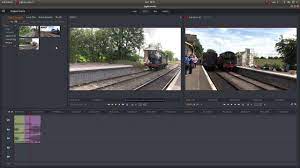
This software offers effects and a library of video and audio files you can incorporate into your project.
Pros
- Lightworks offers a free plan which you can get started with.
- It’s a good tool to help you get started with understanding the ins and outs of editing videos.
Cons
- The free version has limited exporting options.
- Lightworks has some level of a learning curve for new users.
Cost
There’s Lightworks Free, Lightworks Pro for $23.99 per month, Lightworks Pro Yearly for $239.99 per year and Lightworks Pro Outright for $389.99 for life.
WeVideo
WeVideo is an intuitive video making and editing software.

This tool makes it easy for users to create, edit and share their video content.
Pros
- It’s user-friendly.
- WeVideo offers various templates for creating captions and titles.
- You can access over 1 million pieces of stock content such as images, videos and music.
- It’s available on all devices including mobile applications.
Cons
- It has limited text customization options.
- The free version has quite limiting features.
Cost
WeVideo offers a wide range of plans for individuals and businesses, including the educational sector.
The individual and businesses plans start from $4.99 per month (billed annually).
There’s also a $7.99 per month plan, $19.99 plan and $36.99 per month plan.
Each of these are billed annually with options to pay per month (at higher per month prices).
For education, there’s a teacher plan of $89 per year and classroom plan of $299 per year. WeVideo offers additional custom options.
Blender
For anyone looking to create animated films, video games and virtual reality content, Blender is a good option.

The software covers the 3D pipeline and therefore aids the creation of such content.
Pros
- It has advanced and multiple functions to help you create 3D content.
- Blender is free to use.
- The software is lightweight which makes it fast.
Cons
- It can be quite complex for new users with little to no experience.
Cost
Blender is free to use.
Camtasia
Camtasia is a video editing software that enables you to record, edit and share content.

This software is ideal for creating and sharing presentations and video tutorials as it allows you to record your screen.
Pros
- Camtasia is easy to learn and use. It doesn’t require special tech skills.
- It offers templates for you to use.
- It has a simple drag and drop editing feature.
- Camtasia offers a library of royalty-free music to include in your video recordings.
- You can include a personal video recording using the web camera feature.
Cons
- If you’re upgrading to a new instalment of Camtasia, you need to pay for the upgrade. For instance, if updating from version 8.0 to 9.0.
Cost
Camtasia offers a free trial. Afterwards you can pay a one-time fee of $249.99 or $274.99.
DaVinci Resolve
DaVinci Resolve is a comprehensive video editing software.
With this tool, you can carry out color correction on your videos, include visual effects and enable audio post production.
Pros
- DaVinci Resolve allows you to carry out the necessary editing and post production processes without switching between multiple software.
- The software has a ‘pages’ feature which provides specific work areas for different tasks such as editing and visual effects.
- It has a free version.
Cons
- It has a steep learning curve for beginners.
Cost
DaVinci Resolve has a free version.
The paid version, DaVinci Resolve Studio, costs $295.
iMovie
The iMovie video editing software is available to iOS and macOS users to enable easy editing.

You can easily add your clips, audio, filters and all other necessary features.
Pros
- It’s free to use for iOS and macOS users.
- Beginners bc easily get started with it.
- It has a feature that allows you to remove background noise from your videos.
Cons
- iMovie is only available to iOS and macOS users.
Video Management
TubeBuddy
TubeBuddy is a YouTube management tool that provides you with features to aid content optimization.

The browser extension gives you access to advanced keyword research, thumbnail templates and guides on YouTube best practices.
Pros
- TubeBuddy provides video SEO tools to help you achieve higher ranking on YouTube.
- It has production tools that provide information on the best times to upload and start a livestream.
- It offers powerful data tools that can help you track YouTube uploads about competitors and your brand.
Cons
- Each plan is valid for only one YouTube channel. However, if you have more than five channels, TubeBuddy offers bulk licensing.
- It can slow down your YouTube channel user experience immensely due to the strain the software puts on the system
Cost
The browser extension is free and you can choose to upgrade your account for advanced features.
The pro plan is $9 per month (or $7.20 per month if billed annually), the star plan is $19 per month (or $15.20 per month if billed annually) and the legend plan is $49 per month (or $39.20 per month if billed annually).
Social Blade
Social Blade is a social media analytics tool that provides statistics for platforms like YouTube, Instagram and Twitter.

With this tool, you can discover how to better rank your videos and have access to data on businesses and influencers.
Pros
- Social Blade gives you access to their public database containing information and analytics for brands and content creators.
- It offers mobile applications for Android and IOS devices.
- It offers integration features with social media platforms.
- Social Blade makes it easy to search for relevant information.
Cons
- It doesn’t offer integration with all social platforms.
- Social Blade doesn’t have a free version but you can access general lists and statistics on the website.
Cost
Social Blade subscriptions start at $3.99 per month.
The silver plan costs $9.99 per month, the gold plan costs $39.99 per month and the platinum plan costs $99.99 per month.
VidIQ
VidIQ offers tools and guidance to help you boost your YouTube video views.

Since YouTube can serve as an integral part of your video marketing campaign, VidIQ provides productivity tools and data features to aid growth.
Pros
- It offers advanced SEO tools to support YouTube marketing.
- New users can easily navigate it because it breaks down technical features.
- VidIQ offers a free Chrome extension.
Cons
- Requires a paid subscription to access the keyword research tool.
- The free plan has very limited features.
- You need to upgrade to, at least, the boost plan to enable adding multiple YouTube channels.
Cost
You can get the basic plan for free, although it has limited features.
The paid plans start at $7.50 per month for the pro version.
The boost plan costs $39 per month and the boost+ plan costs $415 per month.
AgoraPulse
AgoraPulse is an all-in-one social media management tool that makes it simple for you to manage your social marketing.

With this tool, you can manage, schedule and monitor your marketing processes.
Pros
- It offers important features to help you manage your social media marketing endeavours through a single platform.
- You can schedule multi-platform social media posts.
- It offers a social listening feature to help creators and businesses stay updated with conversations about their brand.
Cost
AgoraPulse offers a free plan and three paid plans.
The Pro plan costs $79 per month (billed annually), Premium plan costs $159 per month (billed annually) and the pricing of the Enterprise plan is tailored to your needs.
YouTube Studio
YouTube Studio makes it easy for YouTube creators to easily manage their channels.

Here, you can view your channel’s statistics, edit video descriptions and review comments.
Pros
- It offers a robust way to manage your YouTube channel.
- YouTube Studio automatically generates captions for your videos.
- You can make edits to your video through YouTube Studio.
Cons
- There are multiple features on the platform so it can be a bit overwhelming to use at first.
Cost
YouTube Studio is free to use.
MorningFame
MorningFame is a keyword exploration and research tool that enables YouTubers to find topics trending in their niche.

This tool allows you to optimize your YouTube videos for better rankings.
Pros
- MorningFame provides you with statistics that reveal your weak points compared with similar channels.
- It provides practical topics to help you grow your channel.
- It gives you a visual representation of what your channel statistics mean.
- MorningFame will send you an email containing a report on your video 24 hours after posting it.
Cons
- You need an invite code to sign up for MorningFame: https://morningfa.me/invite/lqv4nq46
Cost
The Basic plan costs $4.90 per month (or $3.90 per month billed yearly).
The Plus plan costs $12.90 per month (or $9.90 per month billed yearly).
Video Hosting Options
You need to have your videos hosted somewhere and there are free and paid options depending on what you want.
Do you want a more professional video feel, or is it mainly for traffic?
Dailymotion
Apart from YouTube, Daily Motion is another video hosting platform that allows you to share your content with the world.

The platform offers a place for advertisers and publishers to share their stories.
Pros
- Dailymotion supports high resolution videos of 4K quality.
- It provides advanced analytics to help publishers access data on their audience.
- Included are third-party integrations like Google Analytics.
Cons
- It doesn’t have as many unique site visits as YouTube.
- Depending on your user status, there’s a limit to the number of videos you can upload per day. The ‘user’ and ‘starters’ status also have a file upload limit of 60 minutes per file.
Cost
Dailymotion is free to use.
Vimeo
Vimeo is a hosting and sharing platform that provides you with tools to upload content and enable live streaming.
Pros
- You can easily sort your video content into folders.
- Vimeo has a desktop application for Windows and Mac.
- It offers advanced video analytics to help you track video performance.
Cons
- Vimeo has weekly upload limits and limited storage capacity. The specific limit depends on the plan you choose.
Cost
The plus plan costs $7 per month, the pro plan costs $20 per month and the premium plan costs $75 per month.
There’s also Vimeo Basic which is a free plan ideal for people who are not looking to upload a lot of HD videos per week.
Amazon AWS
Amazon AWS is a cloud-computing service that offers various tools for businesses and developers.

Some of the solutions they provide include storage, data management, analytics and mobile development.
Pros
- It offers a wide range of services that enterprises can benefit from.
- It’s available for small businesses to large enterprises.
- There is a pay-as-you-go model and it does not require long-term contracts.
Cons
- It requires some level of experience to navigate Amazon AWS effectively.
- Some of the tools have advanced and complex user interfaces.
Cost
Amazon AWS offers specific pricing for individual services.
Wistia
Wistia is a video hosting platform that is ideal for marketers.
Through the platform, you can create videos, customize your video player and get detailed analytics on your content’s performance.
Pros
- Wistia is more business-centred and therefore provides marketers and businesses with tools to grow their online presence.
- It offers a built-in analytics feature.
- Wistia offers various customization options for your video content.
- There are no ads on Wistia, making it smoother for your audience to watch your videos.
Cons
It is quite a costly video marketing platform to use if you want all the features.
Cost
Wistia offers a free plan for new businesses.
Then, there’s a Pro plan for $99 per month and an Advanced plan with custom pricing.
Vidyard
Vidyard is ideal for marketing and sales teams looking to generate more leads through video content.
You can record videos, share them and track the performance to follow up with prospective clients.
Pros
- Vidyard allows you to share ad-free videos with your audience.
- With Vidyard, you can embed videos in strategic places like your landing pages and website.
- It gives you the ability to include a call-to-action in your videos.
- You can easily record and share videos using the platform.
- It provides analytics to give you details like the number of people that watched your video and for how long.
Cons
- The backend can be a bit difficult for new users to work with initially.
- Due to the costs, it might not be suitable for new businesses or creators.
Cost
There’s a free plan, $19 per month plan (or $180 billed annually), $300 per month plan (billed annually) and $1250 per month (billed annually).
SproutVideo
SproutVideo is a video hosting service for businesses that includes video marketing and analytics features.

It offers premium integrations that help you target prospective clients or customers.
Pros
- SproutVideo offers security features such as password protection tools for videos.
- You can create customized video players to showcase your brand.
- You can customize themes to make video websites with SproutVideo.
- It is easy to set up and navigate.
Cost
The SproutVideo plans include $24.99 for the Seed plan, $59.99 for the Sprout plan, $199.99 for the Tree plan and $499.99 for the Forest plan.
Each of these are per month costs.
YouTube
YouTube is a the world’s most popular video sharing platform.

With YouTube, creators and businesses can easily share or distribute their content to reach their target audience.
Pros
- It’s free and easy to use. You can easily set up an account and start sharing videos.
- It’s a globally used platform so you have a greater chance of reaching more people with your content.
- You can monetize your content once your channel grows.
- It provides tools for businesses and creators such as analytics and video editing through YouTube Studio.
- The most renowned video marketing platform
Cons
- You can get ads showing before your video.
Cost
YouTube is free to use
YouTube Ads Softwares
Video ads are big business.
Here are the best video marketing tools that are related to YouTube advertising.
TubeSift
TubeSift is a tool that allows you to easily find placements for your YouTube Ads.
This targeting tool supports entrepreneurs and businesses to create high-performing ad campaigns.
Pros
- The keyword search and placement lists take away the manual process of discovering the right words and placements for ads.
- The research tool is easy to use.
- You can use the tool to discover what’s happening in your industry and the people creating videos.
Cost
The pricing plans are either $67 per month or $497 per year.
Biteplay
Biteplay is another powerful YouTube Ads targeting software.
With Biteplay, you have access to several features including discovering trends, content research and tracking conversion.
Pros
- You can discover the best videos to place your ads on.
- The software includes ad templates.
- It also includes an influencer search feature.
Cost
The Starter plan costs $99 per month, the Pro plan costs $199 per month and the Agency plan costs $399 per month.
Text to Speech Software
For many reasons, people do not want to speak on their actual videos.
So these video marketing tools help you in that regard.
VoiceOverMaker
VoiceOverMaker is a good option if you’re looking to generate speech from text.

You can use it to create various styles of videos that require voice overs.
Pros
- VoiceOverMaker offers a naturally spoken language that’s close to the human voice.
- You have access to over 600 voices.
- VoiceOverMaker has over 30 language and language variants.
- The software has an advanced text-to-speech and video editor.
Cost
VoiceOverMaker’s pricing isn’t subscription-based. Instead, the costs depend on the number of characters you upload.
Prices include €7 for the standard plan, €12 for the medium plans and €28 for the large plan.
There’s also a free version which has limited characters that you can upload.
VoiceMaker
VoiceMaker is another text to speech software that offers a wide range of voices in many languages.

VoiceMaker also presents an affordable pricing structure that’s easily accessible to creators and businesses in various sectors.
Pros
- The premium plan has over 600 AI voices.
- VoiceMaker offers an affordable pricing structure.
- You can alter things like pitch, voice speed and audio style.
- Choose between either standard or natural voices.
- You can use it for personal and commercial purposes.
Cons
- The free plan lacks extensive high-quality features.
Cost
There’s a free plan with limited features.
The paid plans include $5 per month, $15 per month and $50 per year.
They offer price slashes from time to time.
Micmonster
Micmonster is a voice over tool that allows you to easily convert text into natural human-sounding voices.

Anyone can easily navigate this tool and it offers extensive features that make it unique.
Pros
- You can control the voice emotions, change the speed and pitch, and include the right accents.
- You get access to professional and natural sounding voices.
- It requires no special tech skills to get started.
- You can choose from 48 languages and dialects.
Cost
Micmonster has a one-time payment of $99.
However, the company has been running a discount and selling it for $37.
There’s also an upsell which costs an additional $67.
Amazon Polly
Amazon Polly allows you to create speech from text using software.
A unique feature this software has is that you can create a custom brand voice for your business.
Pros
- It offers the ability to create a custom voice for your business or organization.
- Amazon Polly provides natural sounding voices.
- You can customize the voice output to suit your needs.
- It offers a pay-as-you-go pricing model.
Cons
- There’s limited control over the pitch which may make it unsuitable for lengthy text conversions.
Cost
Amazon Polly standard voices cost $4 per 1 million characters.
The neutral voices cost $16 per 1 million characters. You will be billed per month for each of these.
There’s also a free version which includes 5 million characters per month for the first year or 1 million characters per month for neutral voices for the first year.
WellSaid Labs
This text-to-speech tool provides you with features that simplify converting text to speech.

WellSaid Labs allows you to create voice avatars for specific content.
Pros
- You can create AI voice avatars that are specifically for your brand.
- You can either use stock or custom voices for your videos.
- WellSaid Labs has a ‘teams’ feature that enables collaboration.
Cost
The Maker plan costs $79 per month (currently$49).
The Creative plan costs $149 per month (currently $99).
Meanwhile, the Producer plan costs $299 per month (currently $199).
You can also contact the sales department if you require a custom plan for teams.
Stock Footage Options
If you are looking for royalty free video clips, then check out these options we have listed below.
These are very useful for crafting high quality videos.
Pexels
Pexels is one of the largest and most popular stock footage sites.

The site offers royalty-free videos and images that you can use for personal or commercial purposes.
Pros
- Pexels footage is free to use.
- You can find high-quality footage of up to 4K quality.
- It’s easy to search for what you’re looking for using categories.
- You’re not required to give attribution when you use the footage, despite it being free.
Cost
Pexels is free to use.
Coverr
Coverr is a stock footage site that was specially created for entrepreneurs, builders and dreamers.

Here, you can find videos to use for purposes such as social media content, Zoom backgrounds and many more.
Pros
- Coverr is a free stock footage website.
- You can search for specific footage using the streamlined categories like “life with masks”, “vacation”, “Zoom virtual backgrounds” and many more.
Cons
- The site has limited footage in 4K quality.
- The license doesn’t cover footage that shows brand names or logos so it’s best to be cautious with such uses.
Cost
Coverr is free to use.
Pixabay
If you’re looking for short clips to use for your video marketing strategy, you can find many of them on Pixabay.
This site provides free stock photos and footage that you can use without attribution.
Pros
- You can use the videos for both non-commercial and commercial purposes.
- Pixabay doesn’t require attribution or credit when you use and post the videos.
- You can find high-quality footage of up to 4K quality.
- Apart from videos, you can also access royalty-free music and images.
Cons
- It doesn’t offer a wide range of formats and content compared to some paid sites.
- It offers mostly short videos.
Cost
Pixabay is free.
Shutterstock
Shutterstock is an all-in-one content site.
You can explore content such as videos, music, illustrations and more using various categories.
Pros
- You can find a wide range of video content, images, editorial visuals, music, illustrations and vectors on Shutterstock.
- Shutterstock has a “search by image” feature that makes it easy to find similar photos to those you have saved.
- Shutterstock offers a wide range of categories to explore.
- You can find footage in HD and 4K quality.
Cost
Shutterstock video subscriptions start from $99 per month for 5 clips (requiring an annual commitment or $189 billed monthly).
The 10 clips subscription costs $159 per month (requiring an annual commitment or $359 billed monthly) and the 20 clips subscription costs $199 per month (requiring an annual commitment or $669 per month).
If you’re not ready to settle for subscriptions, Shutterstock offers a range of clip packs that you can purchase based on your needs.
ArtGrid
ArtGrid allows you to explore stock footage using specific categories such as collections and even by filmmakers.
Unlike many other stock footage sites, you can access videos of up to 8K quality on ArtGrid.
Pros
- You can sort content by filmmakers.
- You can find video clips in various formats up to 8K resolution.
- ArtGrid allows you to search for content using specific tags like vintage, transportation and time lapse.
Cons
- There’s no free plan and the trial account only allows you to download watermarked content.
- ArtGrid does not offer monthly plans so you have to purchase an annual plan.
Cost
The Junior HD plan costs $299 per year, the Creator 4K+ plan costs $479 per year and the Pro RAW/LOG plan costs $599 per year.
Webinar Platforms
The platforms below help you create webinars easily.
These tools can help you engage your audience and make more sales.
WebinarJam
WebinarJam is a platform that allows you to connect with your audience through presentations.

This cloud-based broadcasting technology enables you to connect with up to 5,000 people per presentation.
Pros
- The platform allows each webinar to have more than one presenter. The number of presenters depends on the plan you subscribe to.
- WebinarJam presents videos in high quality to prevent pixelated visuals.
- You don’t need to download or install it.
Cons
- The highest software plan can only accommodate up to 5,000 people. This might not suit companies that have larger audiences.
- There’s a maximum duration on each plan.
Cost
The basic plan costs $499 per year, the professional plan costs $699 per year and the enterprise plan costs $999 per year.
ClickMeeting
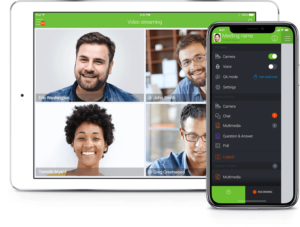
ClickMeeting is another webinar software that can help you host your customers to showcase your brand, products and services.
Pros
- It offers various solutions such as online meetings, live webinars and virtual events.
- It offers a simple and intuitive platform to use.
- There’s the option to scale up and organise large virtual events of up to 10,000 people.
Cons
- Only 25 people can attend the online meetings regardless of the ClickMeeting plan.
Cost
ClickMeeting offers a 30-day free trial.
Afterwards, you can opt for the live plan of $25 per month (billed annually), automated plan of $40 per month (billed annually) or the custom enterprise plan (you’ll need to contact ClickMeeting for pricing details on this plan).
GoToWebinar
GoToWebinar is a virtual conference and webinar software that enables you to host events such as trainings and marketing events.
Through this software, businesses and marketers can easily engage with their target audiences.
Pros
- It’s easy to set up webinars with GoToWebinar.
- You can choose a flexible plan that allows you to pay-as-you-go.
- It has screen sharing options for effective presentations.
- GoToWebinar has a mobile application.
Cons
- GoToWebinar doesn’t offer a free plan.
Cost
The Starter plan costs $109 per month (billed annually), the Pro plan costs $249 per month (billed annually) and the Plus plan costs $499 per month (billed annually).
The Starter plan accommodates 100 participants, Pro plan accommodates 500 participants and the Plus plan accommodates 1,000 participants.
GoToWebinar is currently running discounts on their plans.
Also, you can decide to opt for a flexible plan that allows a pay-as-you-go model.
Demio
Demio is a simple and user-friendly platform that makes it easy to run your webinars.

With this tool, you can easily customize your webinars to showcase your brand to your audience.
Pros
- Demio allows you to brand your webinar experience.
- You can track your event analytics and view the people that engage your content.
- You can increase your webinar engagement by creating polls and quizzes.
- With Demio, you can improve conversations by integrating marketing applications like ConvertKit, Marketo, Mailchimp and others.
Cost
The Starter plan costs $49 per month and the Growth plan costs $99 per month.
Demio also has a custom Premium plan that requires contacting them for a personalised quote.
StealthSeminar
You can run live or pre-recorded seminars using the StealthSeminar tool.

With this webinar platform, you can work towards generating leads and sales while also tracking your webinar’s statistics.
Pros
- StealthSeminar works well with platforms like Facebook and email tools.
- You can create automated webinars with StealthSeminar.
- StealthSeminar allows you to track the performance and results of your webinar.
- They offer templates for presentations.
Cost
The Starter plan costs $69.95 per month.
The Professional plan costs $99.95 per month.
Finally, the Growth plan costs $175.00 per month for 300 simultaneous attendees or $280.00 per month for 500 simultaneous attendees.
StealthSeminar also has a Power plan which has customized pricing.
EverWebinar
With EverWebinar, you can create pre-recorded or on-demand webinars for your audience.

This software makes it convenient to create and upload evergreen webinars that seem like they’re live.
Pros
- EverWebinar is simple to set up. You can easily get started with it.
- You can automate your webinars and focus on other aspects of your marketing plan.
- It offers high definition video quality.
- You can create webinar schedules using the platform.
- Ability to create and include a live chat simulator in your pre-recorded webinars.
- You can import sessions from WebinarJam into EverWebinar.
Cons
- EverWebinar doesn’t have a free plan.
- EverWebinar is only for automated webinars so you can’t host live sessions.
Cost
The Monthly plan costs $99 per month, the Annual plan costs $42 per month (billed annually) and the Biennial plan costs $34 per month (billed every two years).
Best Video Marketing Tools: Conclusion
The video marketing tools we’ve examined in this article can help you take your video marketing strategy to the next level.
Many of these tools are easy to use and offer free versions or trials.
You can choose to opt for a free version or trial before upgrading to a paid plan.
Whether you want to create explainer videos, kickstart your marketing campaigns, craft high quality videos or something else, there is something for you.e
If you feel we missed some video marketing tools please let us know below.
Begin your video marketing campaign today by using some of these video marketing tools to support your production process.
References
[1] Rozario-Ospino, J. Social Video Trends: Marketer Insights for 2020.
[2] McCormick, K. 75 Staggering Video Marketing Statistics for 2021.