
Deciding on the right video creation tool can be a daunting task so this Wave.Video vs Pictory battle will be interesting.
Especially when trying to choose between these two popular video editing and creation platforms.
As you research and weigh your options, it’s important to consider specific features.
Things like ease of use, and pricing to determine which software best suits your needs.
By comparing Wave.video and Pictory, you’ll find that both platforms have their strengths and weaknesses.
As you delve deeper into the details, remember that your decision should be based on which platform offers the functionalities and support you need to create stunning videos with ease.
Table of Contents

Wave.video and Pictory Overview
In this section, we will provide an overview of Wave.video and Pictory, two popular video creation tools.
We will discuss the background and key features of these platforms.
All so you can make an informed decision on which tool might be the best fit for your needs.
Wave.video Background
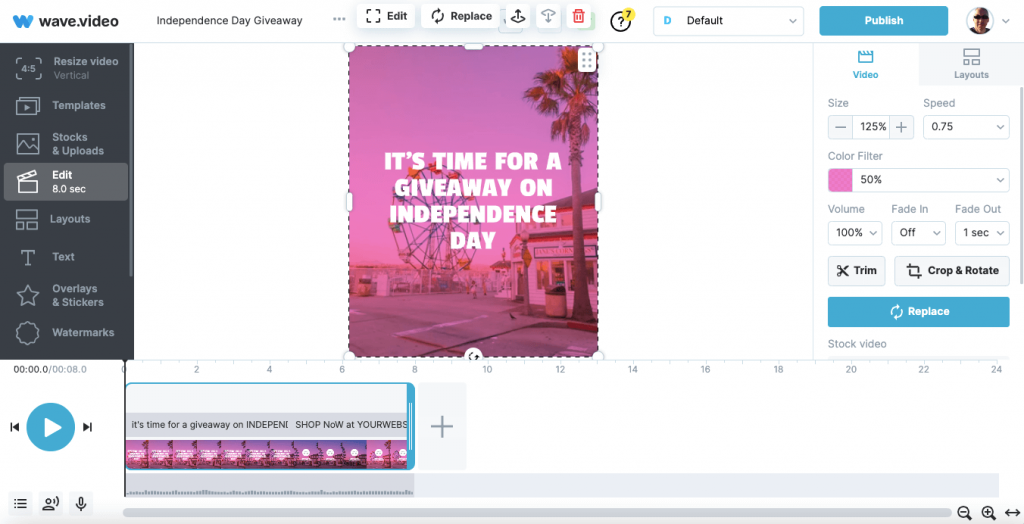
Wave.video is a powerful video creation tool that helps you create engaging videos quickly and easily.
This platform is known for its user-friendly interface and rich library of templates.
In addition, the customization options that allow you to create professional-looking videos in minutes.
With Wave.video, you can leverage features such as:
- A vast selection of video templates
- Intuitive drag-and-drop video editor
- Integration with royalty-free stock libraries for video clips, images, and audio

Wave.video’s versatility makes it an excellent choice for businesses, marketers, and content creators alike.
People who are aiming to improve their video content game without the need for advanced technical skills.
Pictory Background
On the other hand, Pictory stands out for its AI-powered capabilities that enable automatic video creation and captioning.
The domain is even Pictory.AI.
This platform simplifies the video creation process.
It allows you to spend less time editing and more time focusing on your content strategy.
Key features of Pictory include:
- AI-driven video summarization, condensing lengthy videos or text-based content into engaging summaries
- Multi-language support for video captions, ensuring wider audience reach
- Extensive customization features, giving you full control over the look and feel of your videos

Pictory’s unique approach to video creation, driven by artificial intelligence.
This can streamline your workflow.
What’s more, enhance productivity, making it a formidable option for video marketers and businesses looking to expand their content reach.
Now you have a better understanding of Wave.video and Pictory.
Next, it’s up to you to decide which platform aligns best with your video creation needs and preferences.
Features Comparison
Editing Capabilities
When comparing Wave.video and Pictory, you’ll find that both platforms offer a range of editing tools to enhance your video creation experience.
Wave.video stands out with its more comprehensive video editor.
Meanwhile, Pictory is known for its AI-powered features.
Templates and Designs
In terms of templates and designs, your options are vast on both platforms.
However, Wave.video has an edge here.
Wave has over 1000 templates!
Whereas Pictory has just over 40.
So a huge difference here.
Both provide a sizable library of b-roll footage along with stock images to enhance your designs.
Though, if you need something ultra specific you might have to add your own media.

Video Hosting and Live Streaming
Wave.video excels in this category.
Offering not only video hosting but also live streaming capabilities.
So, this makes it ideal for hosting webinars, live events, and more.
Pictory does not currently offer live streaming or video hosting services.

Collaboration and Team Functions
When it comes to collaboration and team functions, both Wave.video and Pictory provide options for seamless teamwork.
However, specifics regarding team collaboration features may vary between the two platforms.
Always check the platforms’ websites for the most up-to-date information on collaboration features.

Music, Audio and Voice-Over
Animations and Transitions
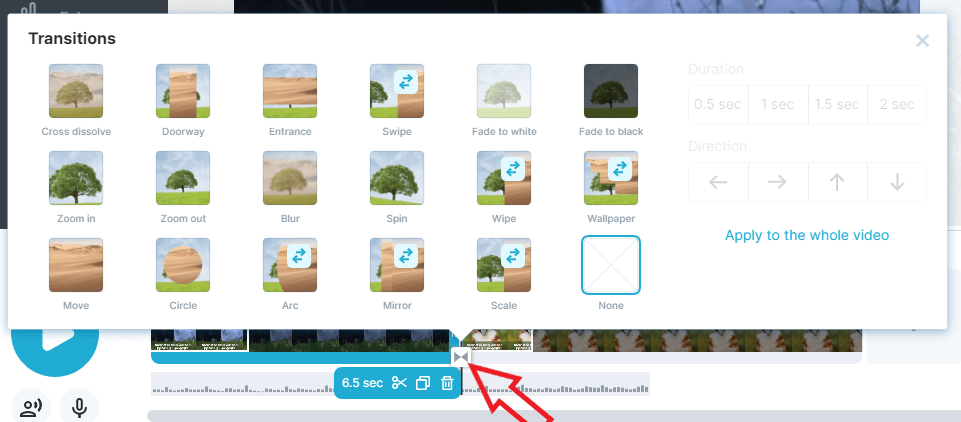
While both platforms allow you to add animations and transitions to your videos, it’s important to consider each tool’s flexibility and ease of use.
Pictory is praised for its AI-powered capabilities and automatic captioning.
Whereas Wave.video offers a greater variety of customization and animation options for seasoned video creators.
Your choice will depend on your specific needs and preferences.
AI-Powered Functionality
Text-to-Speech Voices
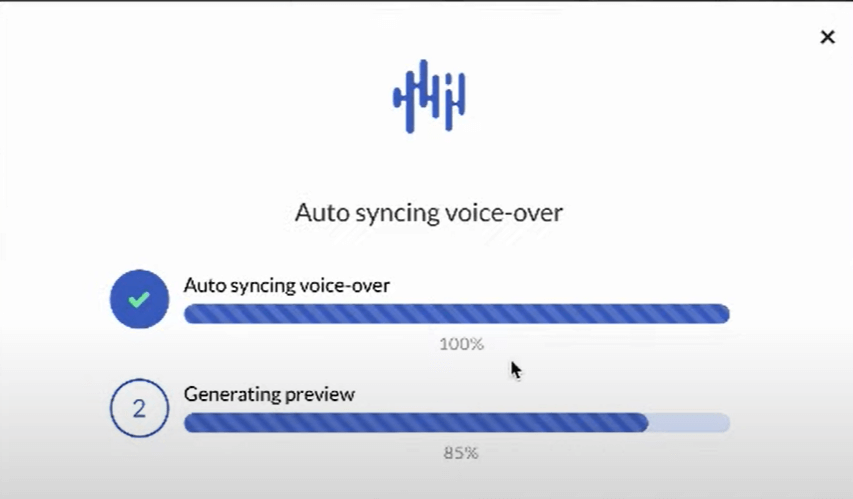
When using Wave.video, you’ll enjoy a wide range of text-to-speech voices to choose from.
This feature is particularly valuable for those who want to create voice overs without hiring a professional narrator.
With Pictory AI, you can also benefit from its auto-voiceover feature.
I’ll be honest and feel neither text-to-speech capabilities are the best and you end up with robotic, monotonous voices.
On the flip side, I do get the attraction if you are super shy.

Video Summarization
Another powerful AI-powered feature that Wave.video offers is video summarization.
This feature allows you to create concise, impactful videos by automatically summarizing the main points of your content.
By using video summarization, you can deliver your message more effectively.
And ensure your audience retains key information.
I have found though, that this sometimes means your message is lost.
So keep an eye on your summarized script.

Ease of Use and User Experience
User Interface and Navigation
When it comes to user interface and navigation, Wave.video excels at providing a user-friendly and straightforward solution.
The platform comes with a range of features for you to experiment with.
This helps you create professional-looking videos without any hassle.
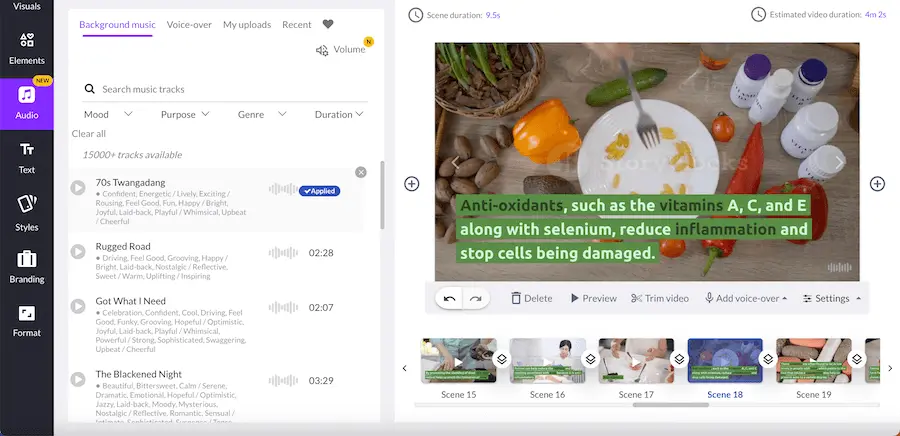
On the other hand, Pictory also offers a decent UI/UX experience.
Once you’ve grasped the basics, Pictory’s interface becomes easier to navigate.
Platform Accessibility
Wave.video ensures platform accessibility by offering a wide variety of customization options and cloud storage capabilities.
As a result, you can access your projects from any device, anytime, making the process incredibly convenient.
The platform offers:
- Mobile app support
- Cross-platform compatibility
- Cloud storage for your projects
- Multiple video formats to work with

In comparison, Pictory also offers a fair amount of accessibility, but it might not be as extensive as Wave.video.
To summarize, both platforms provide useful tools and user-friendly interfaces for creating videos.
Pricing and Plans
When comparing Wave.video and Pictory, it’s essential to consider their pricing structure.
And, of course, the available plans to determine the best fit for your needs.
Wave.video

Wave.video offers a free plan for you to try their platform, saving your budget while still assisting you in video creation.
Their paid plans start at $16./month providing more advanced features to help enhance your videos.
Their pricing is structured on a flat rate, giving you an idea of your expenses upfront.
Here are some key features and pricing tiers for Wave.video:
- Free Plan: Limited features and watermark on videos
- Paid Plans: Starting at $16.00/month, removing watermarks and unlocking more advanced features
Pictory
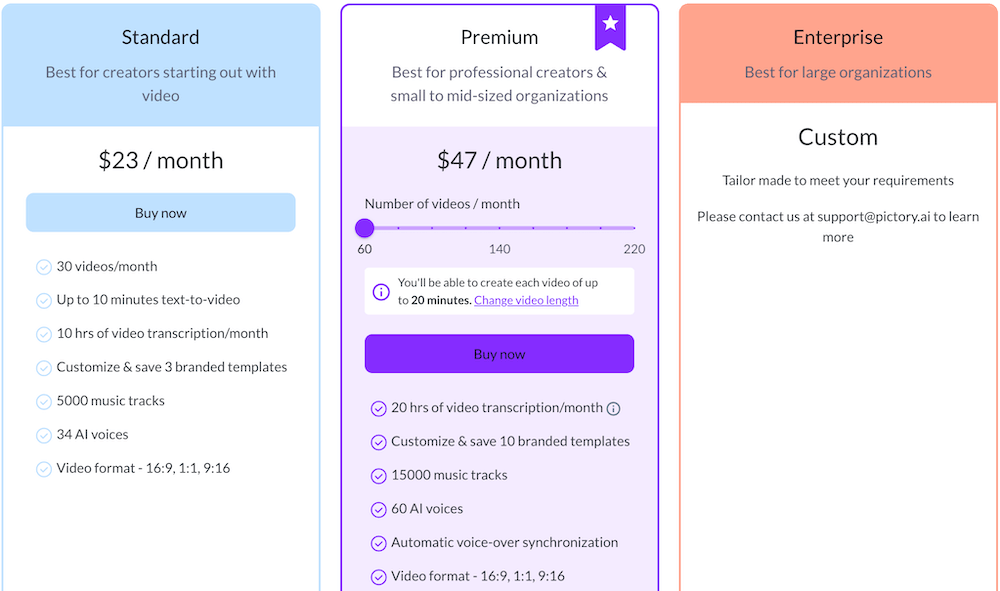
Pictory also provides a free plan.
You only get 3 free videos to try it out.
Now, it’s important to know that their pricing model is based on a per-user basis.
This may affect the overall value for money, depending on how many users you have in your organization.
Here are some key features and pricing tiers for Pictory:
- Free Plan: Limited features and watermark on videos
- Paid Plans: Starting at $23/per-year/user, removing watermarks and unlocking more advanced features
Customer Support and Training

When it comes to customer support, Wave.video offers a variety of channels to assist you with your questions and concerns.
You can get in touch with their support team via live chat and email.
This ensures that your needs are addressed promptly.
On the other hand, Pictory also provides customer support via a helpdesk.
But not live chat right now.
Training Resources
To help you make the most of Wave.video, the platform provides a wealth of training resources designed to enhance your video-making skills.
These resources are aimed at making your experience using the software as smooth and efficient as possible.

- Tutorials: Wave.video offers step-by-step tutorials, guiding you through the different features and functionalities of the software. This makes it easier for you to create stunning videos from scratch.
- Webinars: You can participate in regular webinars, giving you the opportunity to learn from experts and ask any questions you may have to improve your understanding of the software.
- Blog: Wave.video maintains an informative blog that covers topics related to video-making techniques, best practices, and relevant industry news.
While Pictory also offers some training resources, the available training options are not clearly mentioned.
So, when comparing the two platforms, Wave.video seems to have more comprehensive support and training options tailored to your needs.

User Reviews and Ratings
In this section, you’ll learn about the user reviews and ratings for two popular video editing tools – Wave.video and Pictory.
We will cover the overall quality and specific ratings of each software to help you make an informed decision.
Overall Quality
Wave.video has received 367 reviews ( at the time of writing) and a rating of 4.59 out of 5 stars, while Pictory has 62 reviews, with a rating of 4.68 out of 5 stars.
Although Pictory has a slightly higher rating, Wave.video has a significantly larger number of reviews, demonstrating its popularity among users.
In conclusion, both Wave.video and Pictory offer an array of video editing features, with real user reviews praising their usability and support.

Pros and Cons
Pros of Wave.video
Wave.video offers a comprehensive video editor with a wide range of useful features, making it easy for you to create engaging videos.
- You’ll have access to over 200 million stock images, videos, and audio clips to enhance your projects.
- The platform also supports live streaming, allowing you to immediately connect with your audience.
- With its video hosting capabilities, you can manage and publish your videos conveniently in one place.

Cons of Wave.video
Despite its many strengths, Wave.video has a few drawbacks:
- It may not be the best option for users who mainly require AI-powered features and automatic captioning.
- Though Wave.video has an extensive library, you may find it’s background media selection choice needs editing if you use the text to video feature.
Pros of Pictory
Pictory boasts several advantages over its competitors, with a focus on AI-driven features:
- Their auto-voiceover feature allows you to create professional-sounding videos without needing expert editing skills.
- Pictory’s automatic captioning capabilities help make your videos more accessible and engaging for your audience.

Cons of Pictory
Like any software solution, Pictory is not without limitations:
- Pictory does’nt offer the same breadth of features as Wave.video, especially when it comes to video editing, live streaming, and hosting services.
- The platform’s reliance on AI-driven features might not suit users who prefer manual control and customization over video editing processes.
To summarize, Wave.video shines with its comprehensive editor, huge media library, and streaming capabilities.
Whereas Pictory stands out for its AI-powered tools and automatic captioning.
You can select the platform that best suits your specific requirements and preferences.

Affiliate Programs
Both platforms have an affiliate program.
This means users have the opportuity to make thier investment back by promoting it to their network.
Pictory has a much more attractive program, offering a recurring income,
Whereas Wave pays one time per sale.
This is why, if you research both tools, you’ll find many more people promoting Pictory than Wave.
This is where due diligence comes in.
The best programs are not always the ones you hear more about.
It’s the ones that payout more that people push.

Before You go
In comparing Wave.video and Pictory, it’s evident that both platforms have their strengths.
However, as you assess your video creation needs, you might find that Wave.video stands out for its ease of use and comprehensive features.
Firstly, you’ll appreciate Wave.video’s user-friendly interface, which makes it simple to create engaging and impactful videos.
Regardless of your experience level, this platform allows you to navigate its features with ease, ensuring that you can produce high-quality content consistently.
Next, consider the extensive library of templates, stock footage, and audio that Wave.video provides.
This diverse range of resources ensures that you can create unique videos tailored to your specific needs.
Additionally, the platform’s editing tools help make your video content more engaging, ultimately setting your videos apart from the competition.
Moreover, consider the affordability of Wave.video compared to other video creation platforms.
This aside, Pictory too has its fans and provides a stellar user experience.
Whichever you choose, rest assured you’ll be in good hands.
Just take the time to learn the ins and outs of the platform you choose.
Happy video-making!