
Let’s talk about YouTube Shorts.
These are way for you to watch, discover, and create short content using nothing but your phone.
In this ultimate guide style post, we will go through what shorts are, how to get started with shorts and some best practices for using them.
What Are YouTube Shorts Exactly?
First, what are shorts?
Shorts are a relatively new video experience that let you watch and create short catchy videos, right from your phone.
They are YouTube’s equivalent to TikTok.

They’re vertical videos, 60 seconds or less, and provide an easy, lightweight way to create.
Plus, they connect you to YouTube’s two billion users, giving them a new customized viewing experience of laughs, learning, music discovery, and more.
Whether you’ve been creating video content for years or just getting started, you can instantly reach and entertain new audiences.
YouTube provides shorts creation tools, which let you capture and edit videos on YouTube, right from your phone.
Or, you can upload shorts by following the standard upload flow on mobile, desktop, or your preferred device.
Use the YouTube App
If you create shorts using shorts creation tools, you can use YouTube’s multi-segment camera to string multiple video clips together.
You can add a song or sample audio from other shorts or eligible YouTube videos.
You can add text after and control when it appears and disappears.
Control the speed of your video.
Viewers can find shorts by going into the dedicated shorts tab.
They can also discover them on YouTube homepage, in their subscriptions, on your channel homepage with the shorts featured section, and more.

Shorts will have their own viewing experience separate from regular videos, and once you click into a short, they can scroll through to watch and enjoy more.
Why Use YouTube Shorts?
Now that you know what shorts are, why should you use them?
People are watching more and more shorts around the globe.
The YouTube shorts player has now surpassed 6.5 billion daily views globally.

With its own separate viewing experience, think of it as an additional way for you to create and reach new audiences who’ve maybe never seen your content before.
Shorts shouldn’t have any major impact on the performance of your regular YouTube videos.
Shorts notifications only get sent to subscribers who regularly watch shorts content.
How to Create a YouTube Short?
Now, let’s walk through how to create a short.
To get started, tap the create button, then tap Create a Short.

If you want to add a song to record to, tap add music to view a selection of tracks you can choose for free.
For first time users, you’ll have to allow access to your camera and microphone.

To record a clip, press and hold the capture button or tap it to start recording, and then again to stop.
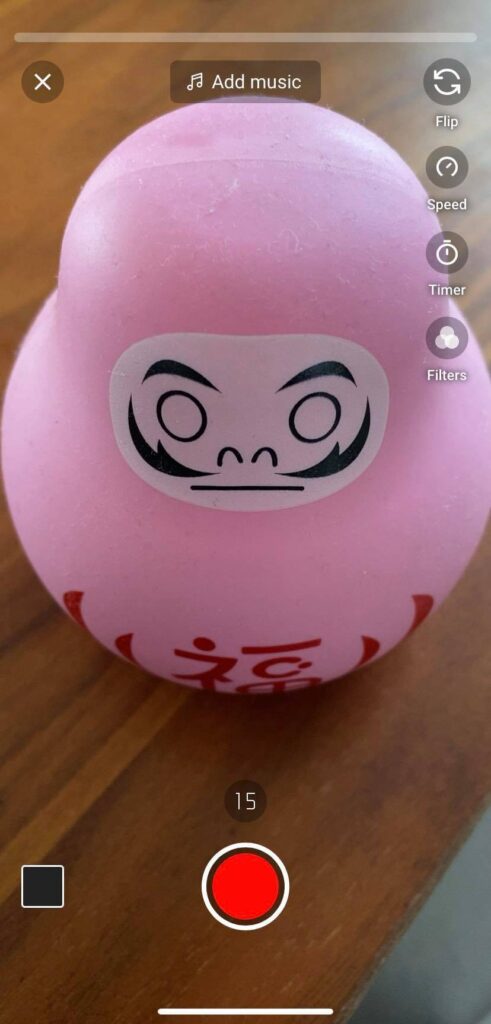
You can tap Undo to remove the previous video clip you recorded or tap Redo to add it back.
Tap Speed to change your recording speed and tap timer to choose the length of your countdown that shows before you start recording and to choose where your recording stops.
Align lets you match up the clip you’re about to record with the previous clip.
You can also add filters to your short.
Preview Time
Once you’re done, tap next to preview your short.
Here, you can add music, if you haven’t already or text to your completed short.

When you add music, you can adjust what part of the song you want to play and its volume.
When you add text, you can use timeline to add multiple text snippets and control when text appears and disappears.
Once you’re happy with your short, tap next to add details like title and visibility.
It’s recommended you add #shorts in your title to help with discovery.
Use Other Creator’s Content?
In addition to making something from scratch, you can make your own version of someone’s video that inspired you.

So you can also create shorts using someone else’s original audio.
To do this, from an eligible video, tap the music icon, then tap use this sound to create a short.
Or, you can go to a video’s watch page and under the video player, tap create to create a short.
Keep in mind that if you choose to use audio from someone else’s video, the owner may delete their original content at any time.
When this happens, any Shorts that used the audio will be muted, set to unlisted, and will be scheduled to delete in 30 days.
But don’t worry, you’ll get an email reminding you before your short is deleted so you can download a version that doesn’t include the audio.
Outside of this creation process, remember that you also can upload any vertical video, 60 seconds or less, using YouTube’s regular upload process.
Best Practices
Finally, let’s walk through some best practices for using shorts.

Any content category can be successful on shorts, but here’s some short form best practices that can help.
Focus on making the first few seconds captivating to grab viewers’ attention and keep your content snappy.
Remember that shorts loop, so pace your content accordingly and think of ways you can encourage replayability.
Try making your content relevant by incorporating a trending moment, event, or song.
Use your authentic voice or show a behind-the-scenes moment, or make content that educates or entertains.
The YouTube Community
You can also get inspired by the YouTube shorts community by checking out pivot pages for other channels, specific audio tracks, or hashtags.

You can post shorts on your main channel or start a second channel.
YouTube’s Algorithm Vs TikTok’s
TikTok has been able to grow at a meteoric rate because of its recommendation engine.
Unlike YouTube, TikTok’s algorithm has been optimized for short-form videos since day one and makes it different from others in the industry.
Time will tell as to whether YouTube can become the leader in short form videos.
It certainly has the infrastructure and finances to do so.
Summary
Experts say that while TikTok is in the lead, Google’s YouTube Shorts is more likely to be a successful competitor.
They add, though, that short-form video remains in its nascent stages and it seems as if there will always be room for two major players going forward.
Be sure to create youtube shorts through the youtube mobile app and see the effect on your youtube channel.
Let us know what you think in the comments below.