
MorningFame: In this post, I’ll walk you through what I believe to be the best YouTube research and analytics tool out there today.
And it’s such a great way for you to do your keyword research, to look at your videos and see which ones have been doing well or doing poorly.
It allows you to make educated decisions moving forward.
So you know where you need to improve and the kinds of videos that you need to make.
And also how you can optimize these videos as well.
Table of Contents
What About VidIQ or TubeBuddy?
Now, in the past, I used to advocate tools such as tube buddy and VID IQ.
VID IQ still has some amazing features.
And I’ve moved away from Tube Buddy.
I found that a lot of their data didn’t make sense and it slowed down my YouTube channel.
Oftentimes, I’d make decisions completely against what Tube Buddy recommended and I’d do really well and vice versa.
But this other tool that I’m gonna show you right now is head and shoulders above that, at least in my humble opinion.
So let’s go and have a look in.

MorningFame
MorningFame is a very simple, slick looking website.

It is a YouTube growth tool that is now available exclusively via invitation.
You must be invited by an existing user if you wish to try it.
So, if you want to peek behind the curtain and see MorningFame’s UI firsthand, you may join up for a one-month free trial.
There is no need for a credit card.
But you will need an invite code.
So, here you go: https://morningfa.me/invite/VMI
MorningFame's Features
MorningFame focuses on two major qualities that it excels at.
The MorningFame traction tool serves as your dashboard, which you may access after entering your information on the login page.
It’s a fantastic keyword planning tool as well as a fantastic video analytics tool.
It will assist you in discovering actionable insights based on the success of your most recent films.

To become a popular YouTube channel, you must gradually enhance your stats.
The Traction tab is at the heart of your channel’s growth.
It allows you to examine your metrics and determine whether or not you are progressing.
How Is Your YouTube Channel Performing?
- Is your channel's growth accelerating?
- Do you receive a lot of video views?
- Are your visitors and subscribers coming back to see more of your videos?
- How long does your typical video view last?
- How many likes do you usually get?
- The number of people who have left comments on your videos?
- How many subscribers do you get for each upload?
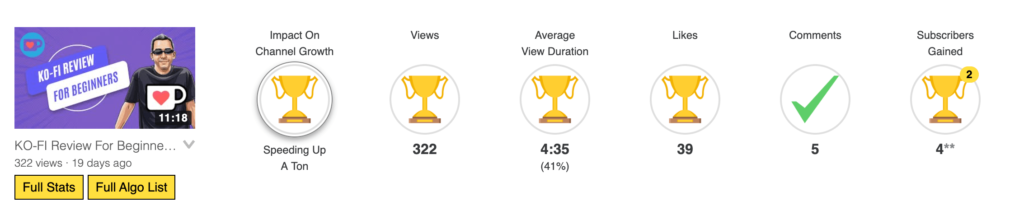
You are able to further dissect this by separating it into all videos, live replays and premieres, and recorded videos.
It makes use of colorful symbols to describe if a certain figure under- or over-performs its expectations.
This makes it incredibly simple to comprehend the overall development of your channel and videos in a matter of seconds, without requiring you to perform an in-depth analysis of the figures.

Video Performance
You can scroll down the page to see the area devoted to your video performance.
Here, Morningfame evaluates the quality of your most recent video performance.
When you initially sign up for MorningFame, it will import the 50 most recent videos from your YouTube account.
After that, it will continue to add and evaluate any new videos you upload.
The video area provides a large variety of filters that may be used to narrow your search, and it also lets you sort the results.
Videos That Are Doing Well

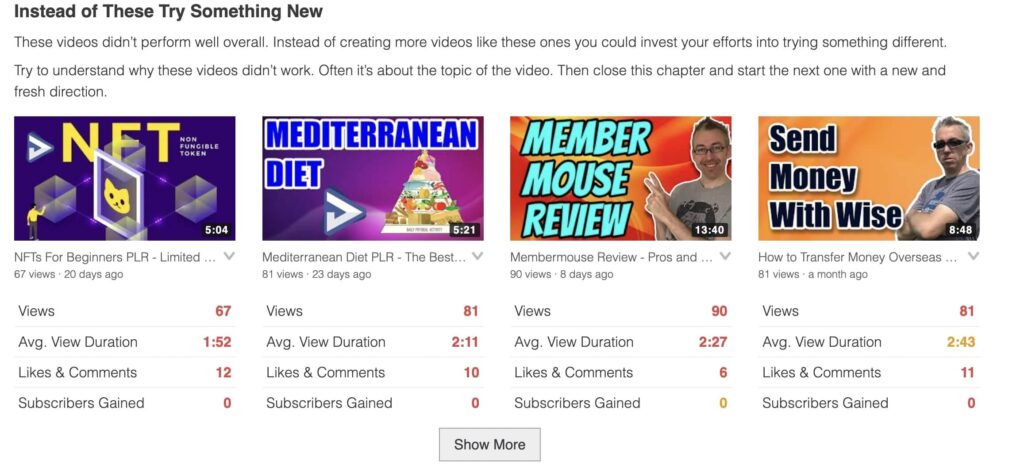
Videos That Are Doing Poorly
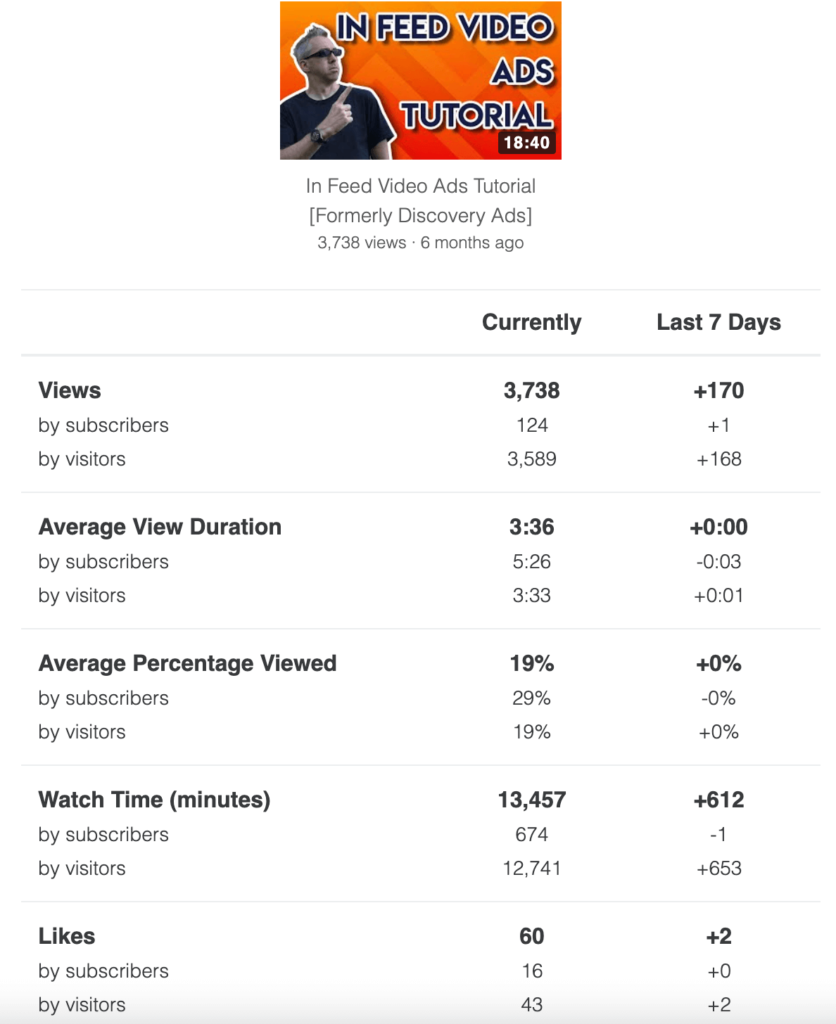
Need More Data?
You can even get more data for one of your videos if you need that.
The Strategy Tab
In MorningFame’s Strategy Tab, you can look at your YouTube growth strategy once a week and make changes.
What should you do next to grow your channel even more?
What do you need to get better at?
Things you should you talk about more often in your videos.
Keep in mind that you can’t always judge your success by the stats alone.
Working on your skills and getting better at them is just as important as:
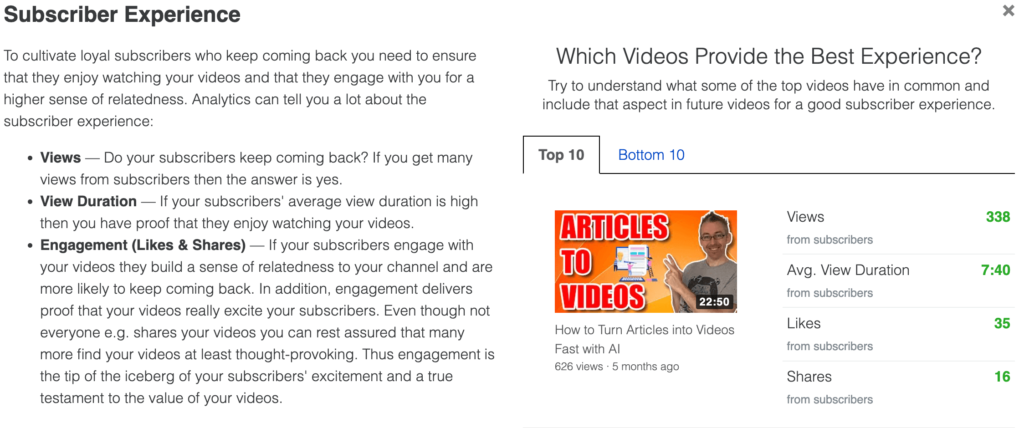
Find out how to watch videos for longer.
Increase the number of times each video is watched.
Make each YouTube video have more likes and comments.
You can get more people to subscribe to your channel if you improve your call to action.
Adjust your YouTube content strategy based on which videos get the most views to keep people coming back for more.
The Workshop Tab
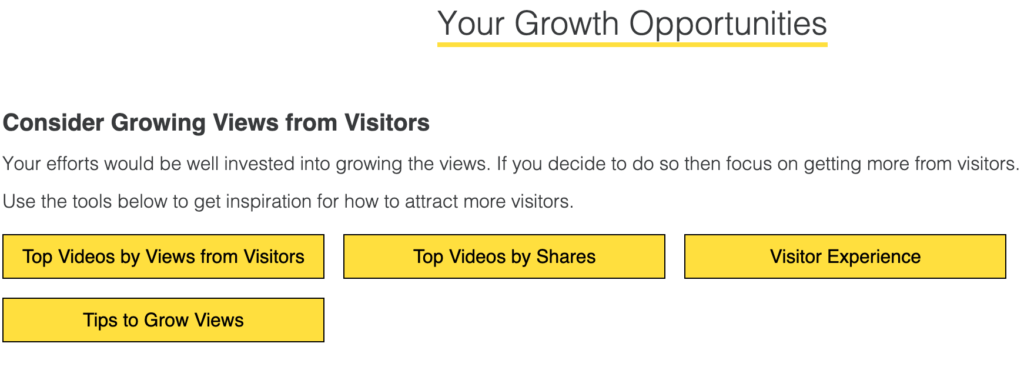
In the workshop tab, you can see things to do to build your channel, such as boosting view time.
MorningFame breaks down how well your channel did by:
Views (views in the last seven days, views from subscribers and visitors)
Watch time (average time spent watching by subscribers and visitors, in minutes)
Engagement (likes, comments, and shares from subscribers and site visitors)
Subscribers (per video, active and returning subscribers)
MorningFame will give you a unique set of ways to grow based on how well your videos and channels do in each of these categories.
For example, it might give you a list of your most popular videos based on how long people watch them.
This way, you can look at these videos to get ideas for how to make your next YouTube videos more interesting and increase the number of people who watch them quickly.
The Velocity Tab
Velocity compares your 50 most recent YouTube videos’ first 72-hour performance.
YouTube’s algorithm heavily weighs a video’s initial 72-hour performance.
It often predicts a video’s future success.
Morningfame shows two graphs for each video’s views and likes over time.
By clicking Details, you may examine comments and dislikes over time.
Analyze any video you want.
Your selected video’s performance will be placed on every other video so you may compare any pair.
What About Your Thumbnails?
Getting a clearer picture of how to best optimize your YouTube thumbnails is made incredibly simple using the Morningfame app.
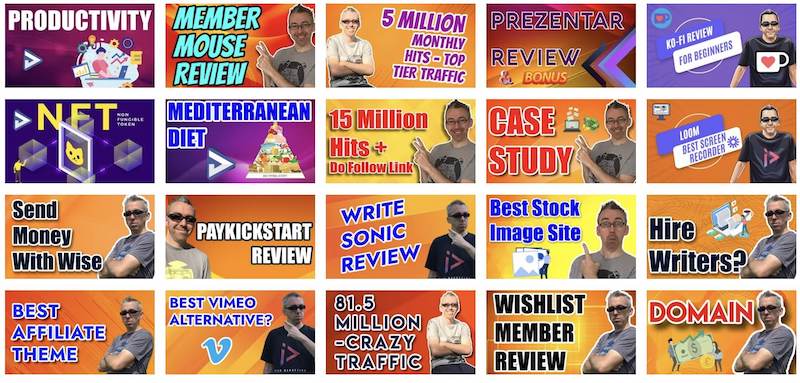
It is much simpler for viewers to identify one of your films if the thumbnail design is uniform across all of them.
This raises the likelihood that they will click on one of your videos, rather than clicking on a video from a channel that they are unfamiliar with.
You will be presented with a grid that has your 20 most recent videos by MorningFame.
This will allow you to easily assess whether or not your thumbnails have a consistent look, which will make it simpler for viewers to recognize and recall your design.
Design is Vital
YouTube recognizes that huge thumbnails provide visitors the best experience.
Yet, depending on the device, thumbnails may be significantly smaller.
It’s crucial to design YouTube video thumbnails with this in mind so that everything is viewable and understandable regardless of picture size.
MorningFame shows your latest video thumbnails in large, medium, and tiny resolutions.
This helps you enhance your internal thumbnail design guidelines and decide which thumbnails to replace.

When Should You Publish Videos?
Morningfame helps you upload videos when your followers have time to view.
If you pick the right weekdays and time of day, you can improve your video’s view velocity, which provides favorable signals to YouTube’s algorithm.
This analysis examines your films’ initial 24-hour view velocity to see if a certain posting time performed effectively for your channel.
YouTube Shorts aren’t included.
Morningfame discovered that Shorts’ performance is unaffected by publishing time.

How Can You Get Traffic from The Algorithms?
You will be able to investigate each algorithm in great depth here, as well as discover how to optimize your films for optimum marketing on YouTube.
Your video views and the amount of time you spend watching them are dissected and studied separately for each traffic source algorithm.
Basically, YouTube will rank your videos in search results based on how well your YouTube SEO (search engine optimization) strategy is working.
You may optimize your films for evergreen themes or hot topics with the help of the keyword planning tool that MorningFame provides.
Google search results: If your videos have been optimized for YouTube SEO and have the appropriate subtitles, then they will also rank well in the search results on Google.
To get the most out of the MorningFame keyword planning tool, you will need to make sure that the Google Search Support option is turned on.
Home: The suggestions that can be found on YouTube’s main app, website, kids app (which includes programs, music, learning, and exploring), and music app are what drive the majority of the traffic to this section.
Suggested: Videos that are recommended to view are listed on the right side of the page where you may watch each video.
These are referred to as “suggested videos.”
The suggestions that smaller YouTube content providers often only receive are for their own videos.
As the popularity of their channel increases, videos will begin to be recommended on channels other than their own.
Elements & Subscriptions
Elements: This is a collection of your video playlists, cards, and end screens, which may be accessed using the link provided.
Subscriptions: Despite being called “Subscriptions,” most of the time subscribers find out about your newly uploaded movies through the “Home” or “Notifications” tabs on YouTube rather than through the “Subscriptions” page itself.
The algorithm that YouTube uses to decide who to notify is dependent on the level of engagement that your viewers have with your channel as well as whether or not they have rung the notification bell.
Shorts & Browse [Home]
Shorts: When viewing vertical Shorts, this algorithm selects the next video to play based on the content of the currently playing video.
Browse/Home: Some believe only large YouTube channels will have the opportunity to have their videos featured on the Trending tab of YouTube.
But this is not true.
What YouTube shows you is based on your past viewing experience.
So a clever creator will look at what top videos are, and make very similar videos.

MorningFame's New Feature Revealed
One of the new tools that will soon be available on MorningFame is a channel comparison tool.
With this tool, you will be able to examine your market and discover a large number of YouTube channels that are comparable to either your own channel or one of your role models.
To get started with your study, enter the name or URL of a channel.
Then, MorningFame will provide a list of channels that are similar to it based on the video themes they cover.
The niche analysis tool will be of tremendous assistance in gaining a better understanding of what is occurring inside your niche.
Who the major players and newbies on the rise are, and what video themes appear to perform well for your individual video topic content cluster.

How Much Does MorningFame Cost?
Thankfully, this tool is very reasonable indeed.
The Basic Plan
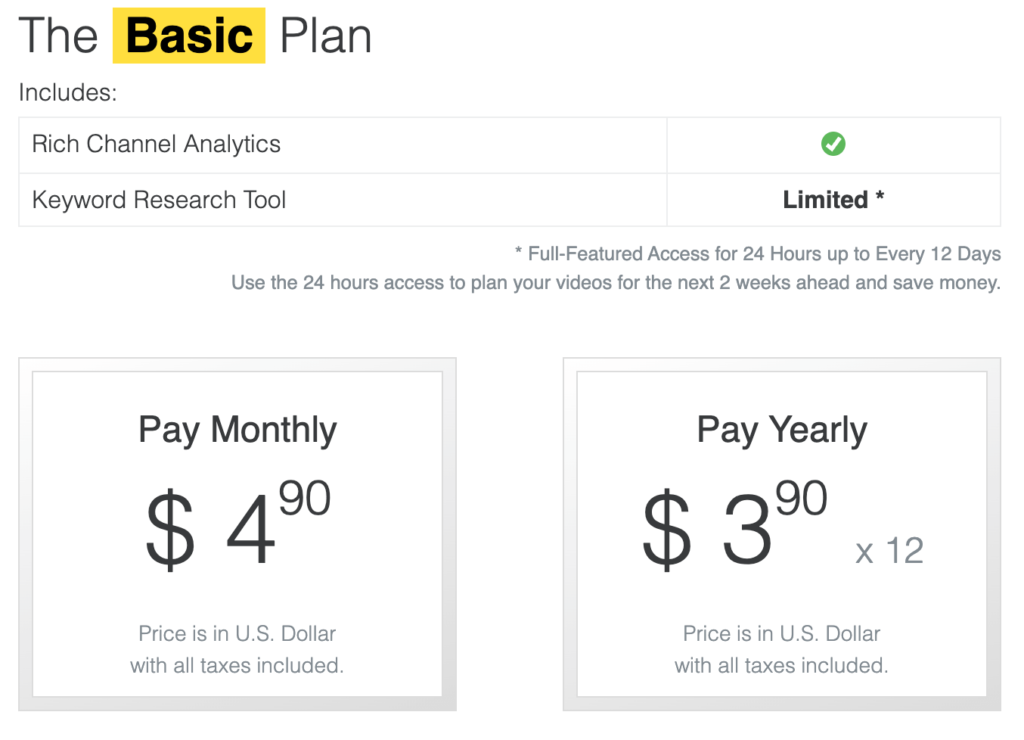
The Basic package includes MorningFame’s analytics tools and keyword planner.
Every 12 days, you may use the keyword tool for 24 hours to design your following two weeks of films.
Monthly payments are $4.90.
Paying yearly reduces the monthly price to $3.90 from $46.80.
The Plus Plan
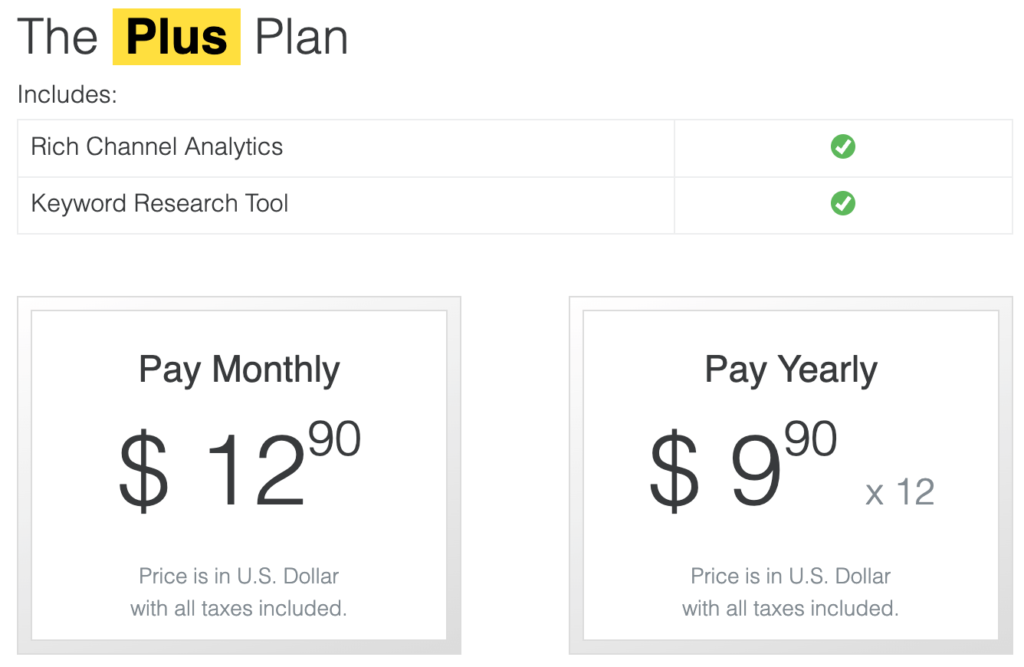
Plus provides you everything in Basic, but the keyword tool is unrestricted.
You can use it every month.
Higher investment.
$12.90/month. With yearly installments, the monthly fee is $9.90.
Not Sure? Grab a Free Trial
Morningfame isn’t free, however you can get a 1-month free sample with my coupon or by visiting here.
MorningFame Video As Final Words
I hope you liked this post about MorningFame and try it out for a month for free.