
Brands can’t afford to ignore vertical video any longer — they’re on the rise!
Think of yourself as a spectator at a major athletic event or a concert by your favorite artist.
The present isn’t enough for you.
You’re looking for more.
Keeping the memory alive is important to you, and you want to do all you can to protect it.
In other words, you’ve done what many others have done countless times before: pulled out your phone, fired up the camera, and pressed the ‘Record’ button on your most memorable moments.
Now, think about this.
Make a mental note of how you’re holding your phone.
If you’re like most people, you’re probably using it in portrait mode while holding it vertically.
In other words, you’re taking part in a major media transition of our time: the relentless move from horizontal to vertical video.
When vertical video was first introduced, it was widely mocked and derided.
Vertical video makers were seen as amateurs and their output was devalued.
That was then, and this is now.
Social media platforms have Embraced Vertical
The vast majority of social media video watchers (Facebook, Instagram, Tik Tok, etc.) use their phones to access these services.
As a result, vertical video is gaining popularity, and now is the perfect moment to get on board.

It’s simple to notice how many people are using their phones when on public transportation, on trains, or even while strolling about town.
Your videos must be optimized for mobile devices if you want them to be seen by as many people as possible.
When it came to video before smartphones, widescreen was always the norm.
When PCs, televisions, and laptops first came out, widescreen media with a 16:9 aspect ratio occupied the most space on them, but this has all changed with the rise of mobile devices.

The 9:16 aspect ratio of smartphones means that our films need to be adapted to maximize the amount of space they occupy on a smartphone screen.
Video in the vertical format takes up 78% more phone real estate than video in the widescreen format, which is a significant difference.
If you want to keep someone’s interest instead of lose it, develop a compelling vertical video to go along with it.
It’s time to make sure your movies are ready for the vertical video revolution.
Here, we’ll discuss how to make vertical videos.
Making Vertical videos
Now, vertical videos are really useful.
But how do you make ones that actually look professional?
Well, you take advantage of softwares that have an abundance of vertical video templates.
We like to use Wave.Video as it’s one of the best tools for creating vertical videos.
If you’d like to check out wave.video, then you can do so here.
Let’s take a look at how to make vertical videos quickly and easily.
Templates
Here are a few of the many templates inside of wave.video.

The Vertical templates have an aspect ratio of four to five.
Now, to be perfectly honest, not all of the templates are gonna be applicable to you.
For the purpose of this post, I chose the Independence day template.
Click on one and it’s gonna open it up and then we’ll have the option to either preview the video or we can edit.

From here, there are lots of cool features and functionalities that we can play around with to make the video unique to ourself or to:
- edit
- delete
- remove
- add different things.
Here is a shot of what the editor looks like:
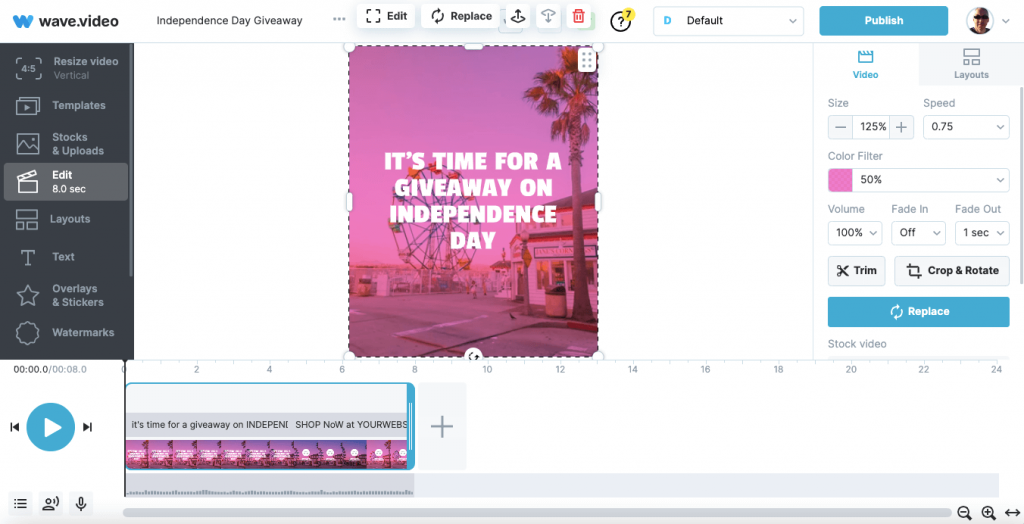
So the video is basically split into three elements.
We have the:
- text
- audio
- scenes
From here it’s actually easier to show you rather than type out what you can do.
This video is a walkthrough on how to use the wave editor
Like with all softwares, there will be a slight learning curve.
But to my mind, Wave is as simple as it gets.
They have a very responsive support team and even a live chat option (based on US time).
You can even become an affiliate for them, though to be honest, there are better programs out there if making a quick buck is more important.
Once The video Is Created
If we really want to, we can actually upload it directly to one of our social media accounts.
So that saves a bunch of time.
One option is to have the video hosted on Wave.Video itself.
They provide a white label link to share.
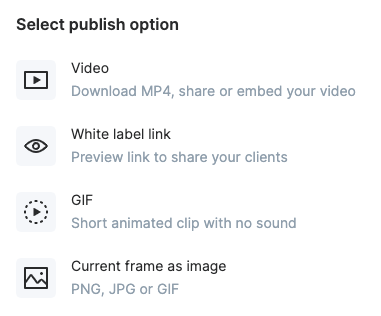
You can simply download the video to your computer for upload to a social media account manually later.
Or, as you can see from the above image, get a GIF or image from the video to share.
The choice is yours.

Make Vertical Videos: Final Words
These days, it might be difficult to keep up with the constantly shifting fashions.
Until recently, 16:9 widescreen video was the norm, but that quickly changed, often faster than most media outlets could keep up.
It’s important to be flexible while creating videos for social media, especially when vertical video content is becoming more popular.
There’s no way around them, therefore you must find a way around them.
While vertical video is now the most popular format, it’s important to keep an eye on the competition, learn from the best, and try new things.
It’s time to go out there and start making unique vertical videos!